Vita IPTV v0.1 brings a native IPTV player to PS Vita and PS TV
A hobby IPTV player for PS Vita and PS TV, built with AI help, with its own modern TLS for https playlists and streams.
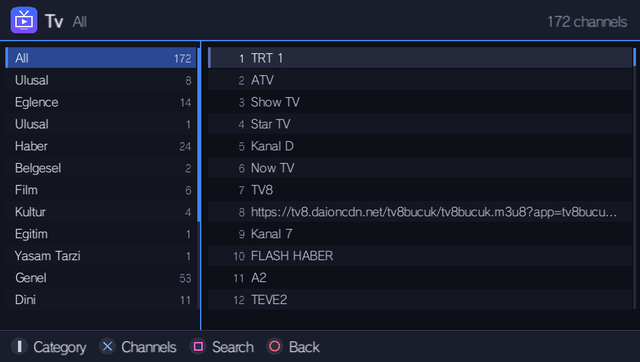
A new homebrew app, Vita IPTV v0.1, puts a native IPTV player on the PS Vita and PS TV. The author, posting on r/vitahacks as /u/mrhkyy, calls it a hobby project shared as is, with no support or roadmap promised. It was built with AI help and tested on their own Vita.
The app plays live TV and radio from M3U/M3U8 playlists, Xtream Codes accounts (server, user, password), or single stream links. Video runs through the Vita’s hardware H.264 decoder, up to 720p. It handles HLS (.m3u8), MPEG-TS, MKV and MP4. Audio is AAC in hardware, with MP2 and MP3 in software, which matters because plenty of TV channels still use MP2. Radio mode lets you press START, kill the screen and keep listening. Settings can hide adult channels and anything 1080p or 4K, since the Vita can’t decode those.
The part I find most interesting is the TLS. The author says the Vita’s own TLS can’t talk to most sites anymore, so the app ships its own modern stack. That’s why https playlists, short links and https/HLS channels work. My opinion: this is the kind of fix that makes an old console useful again. It’s real systems work, not just a nice menu.
The limits are clear. The decoder tops out at 720p H.264, so 1080p, HEVC and interlaced SD won’t play directly. The repo has an optional PC transcoding server (Python + ffmpeg) that converts those on the fly. The app ships no channels or playlists, so you bring your own.
How to try it:
- Download the VPK from the Releases page on the GitHub project.
- Add a source in the app: press Square, pick Xtream, M3U link or single stream, and type it in. Pasting an Xtream get.php link fills everything in.
- Or, from a PC, drop .m3u files into ux0:data/VitaIPTV/, or list several playlists in ux0:data/VitaIPTV/sources.txt.
If a channel won’t play, the screen tells you why.
And the release is modest about what it is.